
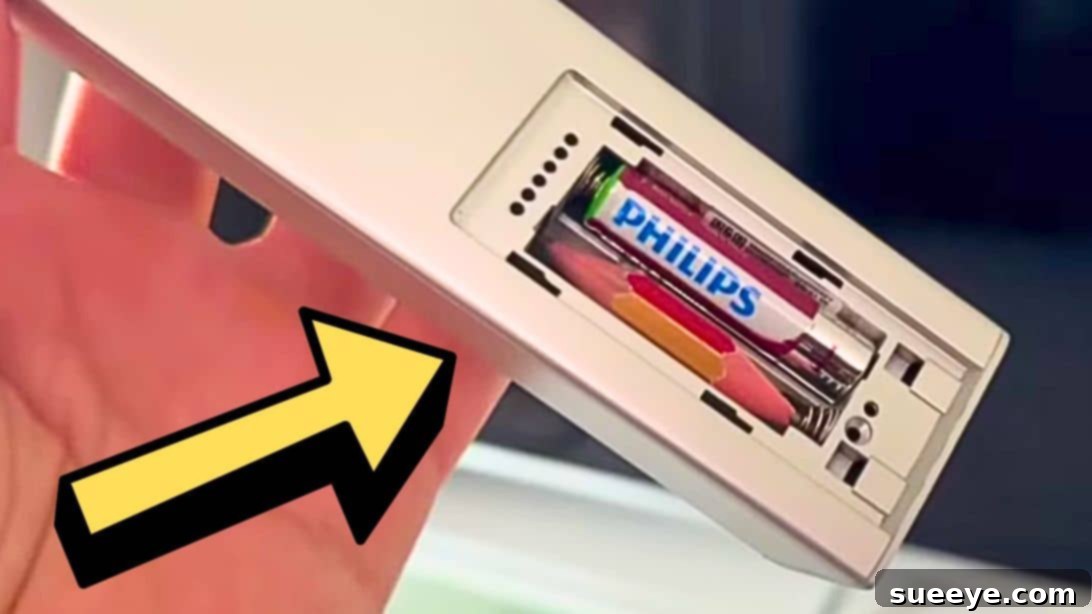
There’s nothing quite as frustrating as settling down for a relaxing evening, only to find your remote control unresponsive. Whether you’re trying to change the channel, adjust the volume, or power on your favorite streaming device, a dead remote can bring your plans to a grinding halt. Often, the culprit is a simple one: a drained battery. But what if you only have one spare battery, or worse, no spares at all, and it’s too late to run to the store? Don’t panic! Thanks to clever innovators like Smart Fox on YouTube, there’s an incredibly simple, zero-cost, emergency hack that can get your remote working again, at least until you can acquire a fresh set of batteries. This ingenious trick leverages a common household item – a pencil – to bridge the gap left by a failing battery. It’s not a permanent solution, but it’s a brilliant temporary fix that can save your evening in a pinch. This guide will walk you through the steps of this effective remote control battery repair trick, explain why it works, and provide crucial warnings to ensure you use it safely and effectively.
Understanding Why Your Remote Stops Working
Before diving into the solution, it’s helpful to understand why your remote might suddenly stop functioning. While our pencil hack specifically addresses battery issues, other factors can sometimes be at play. Knowing these can help you troubleshoot if the pencil trick doesn’t work.
The Common Culprit: Battery Drainage
Most remote controls rely on a pair of AA or AAA batteries to provide the necessary electrical current. Over time, these batteries naturally deplete their charge. When one battery completely dies or becomes too weak to contribute effectively, the entire circuit breaks, and the remote loses power. This hack is specifically designed to temporarily restore that broken circuit when only one of your batteries is completely dead, and the other is still functional.
Beyond Batteries: Other Remote Control Issues
While less common, other problems can cause remote control failure:
- Corrosion: Battery acid leakage can corrode the metal contacts inside the remote, preventing proper electrical flow. Always check for this when changing batteries.
- Damaged Contacts: Dropping the remote can sometimes bend or damage the internal battery contacts, leading to an intermittent or complete loss of connection.
- Infrared (IR) Emitter Problems: The small LED that sends signals to your TV or device can fail. You can often test this by pointing the remote at your phone camera; you should see a small light flash when you press a button.
- Internal Circuitry Damage: Physical damage or component failure within the remote itself can also render it useless.
It’s important to remember that the pencil hack only addresses the issue of a single dead battery. If your remote has one of the other problems listed above, this trick likely won’t solve it.
The Ingenious Pencil Hack: How Graphite Saves the Day
This trick is surprisingly simple yet incredibly effective. It relies on the conductive properties of graphite, the primary material found in pencil lead. When one battery in a two-battery remote dies, it breaks the circuit. The pencil, when correctly inserted, acts as a temporary conductor, effectively bridging the gap and completing the electrical circuit, allowing the remaining good battery to power the remote.
The Science Behind the Simple Fix
Batteries are arranged in series in most remotes, meaning the positive terminal of one connects to the negative terminal of the next. This arrangement increases the overall voltage. If one battery fails, the series connection is broken. Graphite is an electrical conductor, albeit not as efficient as metal. By sharpening both ends of a pencil and placing it where a dead battery would normally sit, the graphite tips can touch the metal contacts of the battery compartment. This allows electricity from the working battery to flow through the graphite, completing the circuit and temporarily powering the remote. Think of the pencil as a makeshift wire, temporarily replacing the missing link in your remote’s power chain.
Materials You’ll Need:
- Pencil (standard graphite pencil)
- Cutter or utility knife
- Pencil Sharpener
Step-by-Step Guide: Implementing the Pencil Battery Hack
Follow these instructions carefully to execute the emergency pencil hack. Safety first, especially when using sharp tools.
Preparation is Key
First, open your remote control’s battery compartment and identify which battery is dead. You need at least one functional battery for this trick to work. If both batteries are dead, this hack will not suffice. Once you’ve determined which slot needs the temporary fix, take your pencil. If it’s not already sharpened, use your sharpener to create a good point at one end. This sharp tip will be crucial for making proper contact.
Precision Cutting for a Perfect Fit
With one end sharpened, hold the pencil next to the empty battery compartment. Carefully measure the length of a standard battery, which is typically the same length as the compartment slot. Using a cutter or utility knife, make a score mark around the pencil at this measured length. Be extremely careful when cutting. Once scored, gently but firmly snap the pencil at the mark. You should now have a pencil piece roughly the same length as a battery. Next, sharpen the newly cut end of the pencil as well, ensuring both ends have exposed graphite tips. These tips are what will conduct electricity.
Making the Connection
Now, with both ends of your pencil segment sharpened, carefully insert it into the empty battery slot. Ensure that both sharpened graphite tips are firmly touching the metal contacts on either side of the compartment. The working battery should already be in its designated slot. The pencil essentially replaces the dead battery, completing the electrical circuit between the working battery and the remote’s internal components.
Testing Your Revived Remote
Once the pencil is securely in place and making good contact, close the battery compartment cover if possible, or simply hold it gently to ensure the pencil doesn’t move. Point your remote at your device and press a button. If done correctly, your remote control should now be functioning! You’ve successfully used a simple pencil to temporarily revive your unresponsive remote. Take a moment to celebrate your DIY ingenuity!
Important Safety Warnings and Considerations
While this pencil hack is an amazing emergency solution, it comes with crucial caveats. It is vital to understand that this is a temporary fix and not a long-term replacement for proper batteries.
Understanding the Temporary Nature of This Solution
The pencil hack is designed for emergency situations only. Graphite is not as efficient a conductor as the metals used in batteries or standard wiring. It also doesn’t provide voltage; it merely completes the circuit. Relying on it for an extended period can lead to several issues. Think of it as a band-aid, not a cure.
Potential Risks and How to Mitigate Them
- Damage to Remote: Prolonged use of the pencil hack could potentially lead to overheating of the remote’s internal components or the graphite itself, though this is rare in low-power devices like remotes. However, poor contact can cause intermittent connections, which can be irritating.
- Short Circuit Risk: While less likely with a pencil due to its resistance, any makeshift electrical connection carries a minimal risk of creating a short circuit if not done correctly, which could damage the remote or the remaining good battery. Ensure the pencil only touches the intended contacts and not other metal parts.
- Battery Leakage: If the good battery is old or defective, the increased load due to the less efficient graphite connection might, in rare cases, accelerate leakage.
- Not for All Devices: This trick is primarily for low-power devices like TV or media player remotes that use two standard AA/AAA batteries. Do NOT attempt this with devices that draw more power, use specialized batteries, or have more complex circuitry, as it could be dangerous and cause irreversible damage.
To mitigate these risks, ensure the pencil fits snugly, makes firm contact, and most importantly, replace your batteries with new ones as soon as physically possible.
Adult Supervision Recommended
When using a cutter or utility knife to prepare the pencil, exercise extreme caution. These tools are sharp and can cause injury. Children should not attempt this hack without adult supervision.
When to Utilize This Life-Saving Emergency Hack
This ingenious pencil trick is perfect for those unexpected moments when a dead remote threatens to derail your plans:
- Movie Night Disaster: You’re just about to start a film, and the remote dies.
- Game Day Dilemma: The big game is on, and you can’t change channels.
- Late-Night Predicament: It’s past midnight, and all stores are closed, leaving you unable to replace batteries immediately.
- Temporary Stop-Gap: You know you need new batteries but won’t be able to get them for another day or two.
In all these scenarios, the pencil hack provides a quick, free, and effective way to restore functionality to your remote, buying you precious time until a permanent solution (new batteries) can be acquired.
Beyond the Hack: Ensuring Long-Term Remote Control Functionality
While the pencil hack is a fantastic emergency solution, it’s crucial to adopt habits that prevent you from needing it frequently. Proactive care ensures your remote controls are always ready when you need them.
Always Be Prepared: Keep Spare Batteries Handy
The simplest way to avoid the dead remote dilemma is to always have a supply of fresh AA or AAA batteries in your home. Purchase them in bulk when they’re on sale, or invest in a set of good quality rechargeable batteries and a charger. This ensures you’re never caught off guard.
Proper Battery Care and Storage
- Remove Batteries from Unused Remotes: If you have remotes for devices you rarely use, remove the batteries to prevent leakage and corrosion.
- Store Batteries Correctly: Keep batteries in a cool, dry place, away from direct sunlight and extreme temperatures. Storing them in their original packaging or a dedicated battery organizer can prevent accidental short circuits.
- Check Expiry Dates: Old batteries can lose their charge even if unused.
Regular Maintenance for Your Remote
Occasionally, open your remote’s battery compartment and inspect the contacts. If you see any signs of corrosion (a white, powdery, or crusty residue), gently clean it with a cotton swab dipped in vinegar or lemon juice, followed by a dry swab. This simple step can prevent future connectivity issues and extend the life of your remote.
Frequently Asked Questions About the Pencil Battery Hack
Here are some common questions people have about this innovative emergency fix:
Is this hack safe for all remotes?
It’s generally safe for standard, low-power remote controls (e.g., TV, DVD player, streaming box remotes) that use two AA or AAA batteries. However, it is explicitly NOT recommended for devices with higher power requirements, sensitive electronics, or those using specialized battery types. Always remember it’s a temporary fix, not a permanent solution, and should be used with caution.
How long can I rely on this fix?
You should only rely on this fix for a few hours or, at most, a day or two – just long enough to get to the store and purchase new batteries. Prolonged use is not recommended due to the potential for less efficient electrical flow and minimal risk of damage to the remote or the remaining good battery.
What type of pencil works best?
A standard graphite pencil (like a No. 2 pencil) works perfectly. The key is the graphite lead, which is conductive. Mechanical pencils or colored pencils will not work as effectively, if at all, because their “lead” is made from different materials or has less graphite content.
My remote still isn’t working, what’s wrong?
If the hack doesn’t work, double-check these points:
- Both batteries are dead: This hack requires at least one working battery.
- Pencil contact: Ensure both sharpened tips of the pencil are making firm, direct contact with the metal terminals in the battery compartment.
- Remote issue: The problem might not be the battery at all. Check for corrosion, physical damage, or other internal issues with the remote itself.
Conclusion: A Clever Trick for Unexpected Moments
The humble pencil, typically used for writing or drawing, proves its surprising versatility as an emergency conductor for your remote control. This quick, free, and incredibly simple hack, demonstrated effectively by Smart Fox on YouTube, is a true lifesaver for those frustrating moments when a dead battery threatens to disrupt your entertainment. While it’s a brilliant temporary solution, it’s paramount to remember its transient nature and to replace your batteries with fresh ones as soon as possible. Armed with this knowledge, you can now face a dead remote crisis with confidence, knowing a pencil and a few careful cuts are all you need to get back to your show. Keep this clever trick in your back pocket – you never know when it might save your day!