
How to Stop iPhone Spam Calls: Your Ultimate Guide to Digital Peace and Quiet
In our increasingly connected world, the convenience of smartphones often comes with an unwelcome downside: incessant spam calls. Few things are as frustrating as having your day interrupted by persistent robocalls, telemarketers, or outright scam artists. These unwanted intrusions are not just annoying; they can be disruptive, time-wasting, and, in many cases, a direct threat to your personal information and financial security. The feeling of missing an important call because you’re sifting through junk, or worse, falling victim to a cunning scam, is something no iPhone user should have to experience.
For years, the problem of spam and scam calls has been escalating. Scammers are becoming more sophisticated, employing advanced tactics like “spoofing” local numbers to trick you into answering, or using complex social engineering to elicit sensitive information. If you own an iPhone and are constantly battling these digital nuisances, you’re not alone. The good news is that you don’t have to tolerate them. There are effective strategies and tools available to help you take back control of your phone line and enjoy the peace of mind you deserve. This comprehensive guide will walk you through six powerful hacks, inspired by expert tips from sources like Payette Forward on YouTube, designed to significantly reduce or even eliminate those irritating spam calls on your iPhone. Whether you’re a tech enthusiast or someone who prefers straightforward solutions, these tips are crafted for everyone looking for a quieter phone.
RELATED: How to Stop Your iPhone From Listening to You
Understanding the Threat: Why Spam Calls Are a Persistent Problem
Before diving into solutions, it’s crucial to understand the landscape of spam calls. “Robocalls” are automated calls that deliver pre-recorded messages, often pushing sales, political messages, or sophisticated scams. These calls are cheap to make in bulk, making them a popular tool for malicious actors. “Spoofing” is when callers intentionally falsify the information transmitted to your caller ID display to disguise their identity, making it appear as if the call is coming from a local number, a legitimate business, or even your own area code. These tactics are designed to bypass your natural skepticism and encourage you to answer, thereby increasing the chances of their scheme succeeding. The increasing frequency and sophistication of these calls make it vital to equip yourself with defensive strategies.
Beyond the sheer annoyance, spam calls pose several risks. Many are phishing attempts designed to extract personal information like social security numbers, bank details, passwords, or credit card numbers. Others are outright scams, ranging from fake lottery winnings and tech support fraud to IRS impersonations and urgent pleas for money, all aimed at defrauding unsuspecting victims. These scams can lead to significant financial losses and identity theft. By understanding these diverse threats, you can better appreciate the importance of implementing the robust solutions outlined below, ensuring both your peace and your security.
Essential iPhone Call Blocking Strategies: Take Control Now
Let’s explore the most effective ways to stop those incessant spam calls on your iPhone, ensuring a quieter, safer mobile experience.
1. Silence Unknown Callers: Your iPhone’s Built-In Defense
One of the most straightforward and effective methods available directly on your iPhone is the “Silence Unknown Callers” feature. This powerful setting automatically sends calls from numbers not found in your contacts, recent outgoing calls, or Siri Suggestions to voicemail. While it won’t prevent the calls from coming in, it will prevent your phone from ringing, offering immediate relief from constant interruptions and allowing you to screen calls at your convenience.
How to Enable:
- Navigate to your iPhone’s Settings app, typically represented by a gray gear icon on your home screen.
- Scroll down the menu and tap on Phone.
- Within the Phone settings, scroll further down until you find the option labeled Silence Unknown Callers. Tap on this.
- Toggle the switch to the On position. It will turn green to indicate it’s active.
Important Considerations: This feature is incredibly useful for most users seeking immediate relief from unwanted rings. However, there’s a significant caveat: if you are expecting important calls from numbers not yet saved in your contacts – such as a doctor’s office, a new client, a delivery service, a job interviewer, or even a friend using a new number – you might miss them in real-time. These legitimate calls will go straight to voicemail, and you’ll only be alerted after the fact. Therefore, assess your daily calling habits before enabling this. If you frequently receive calls from unsaved numbers for business or personal reasons, this might not be the best primary solution, or you’ll need to diligently check your voicemail regularly. For many, however, the trade-off for peace and quiet is well worth it.
2. Silence Junk Callers: A Carrier-Specific Solution
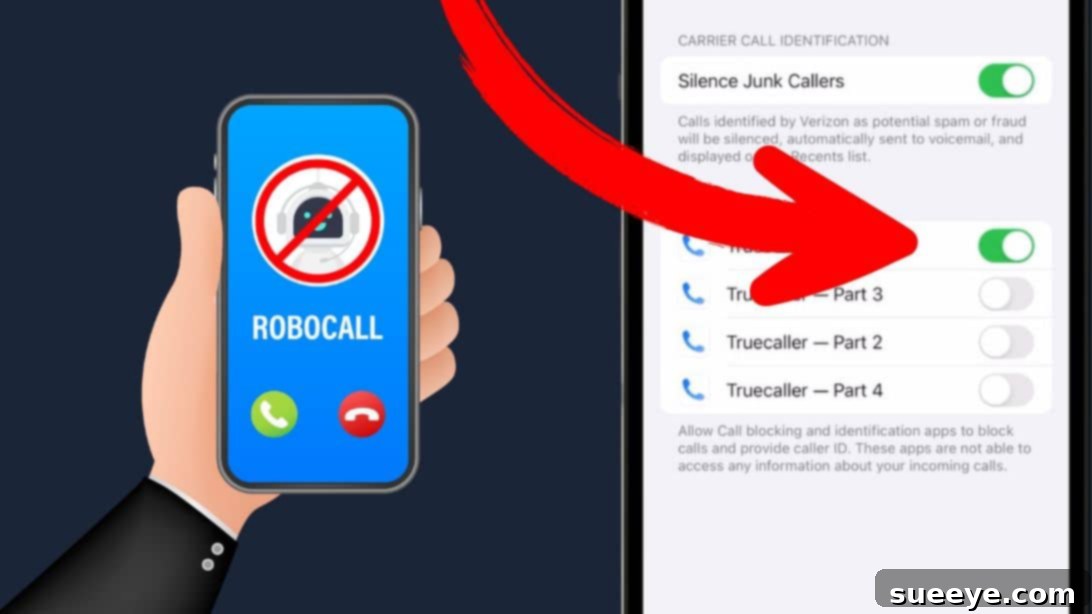
While “Silence Unknown Callers” is an iPhone feature, some wireless carriers offer their own enhanced spam filtering and blocking services. These services often include an option to “Silence Junk Callers,” “Spam Protection,” or a similar designation, which can be more sophisticated as they operate at the network level rather than just on your device. These carrier-provided services frequently utilize advanced algorithms, extensive databases of known spam numbers, and even artificial intelligence to identify and block suspicious calls before they even have a chance to reach your phone.
How to Check and Enable:
- Go to your iPhone’s Settings app.
- Tap on Phone.
- Look for Call Blocking & Identification.
- Within this section, you might find a switch labeled Silence Junk Callers or other options related to your specific carrier’s spam blocking service. Its presence and wording will depend entirely on your provider.
Carrier-Specific Nature: It’s important to note that this option is not universally available on all iPhones or with all carriers. The availability and functionality of features like “Silence Junk Callers” are entirely dependent on your specific wireless provider (e.g., AT&T Call Protect, Verizon Call Filter, T-Mobile Scam Shield). Some carriers offer basic call blocking and spam identification for free as part of their standard service, while others provide more robust premium services with advanced features for a small monthly fee. It’s highly recommended to contact your carrier directly via their customer service line or visit their official website to inquire about their specific spam blocking and identification services and detailed instructions on how to activate and manage them. Leveraging these carrier-level tools can provide a crucial extra layer of defense against sophisticated spam campaigns.
3. Register with the National Do Not Call Registry
The National Do Not Call Registry is a government-maintained database designed to give consumers a choice about whether they receive telemarketing calls. While it doesn’t stop all unwanted calls (it primarily targets legitimate telemarketing businesses and not scammers or political calls), it’s an important first step in reducing the overall volume of unwanted solicitation from legal entities. This can make it easier to identify truly illegal scam calls.
How to Register:
- Open Safari or your preferred web browser on your iPhone.
- Go to the official website: www.donotcall.gov (for U.S. residents, ensure you use your country’s equivalent if you are elsewhere).
- Tap on Register Your Phone.
- Click on Register Here to proceed with the registration process.
- Carefully enter your phone number(s) that you wish to register and provide a valid email address for confirmation.
- You will receive an email confirmation. Click the link provided in the email to complete your registration and activate the Do Not Call protection.
Effectiveness and Limitations: Once successfully registered, your phone number should appear on the registry within 31 days. Legitimate telemarketers are then legally required to stop calling you. However, the registry does not apply to political organizations, charities, companies conducting surveys, or businesses with whom you have an existing commercial relationship (e.g., your bank, airline, insurance provider, etc.). Crucially, it also won’t stop illegal robocalls and scams, as these malicious operators already disregard the law. Think of this registry as a foundational layer of defense, effectively reducing calls from legitimate sources, thereby making the truly illegal and more dangerous spam calls easier to identify and filter out using other methods.
4. Utilize Spam Blocking Apps for Enhanced Protection
For those seeking more aggressive and intelligent call blocking capabilities, third-party spam blocking apps can be invaluable. These applications often leverage large, frequently updated databases of reported spam numbers, employ sophisticated AI-powered analysis to detect suspicious call patterns, and utilize crowdsourced data from millions of users to identify and block unwanted calls in real-time. They can provide advanced caller ID for unknown numbers, warn you about potential scams, and even automatically block calls from known spam sources, often before your phone even rings.
How to Find and Use:
- Open the App Store on your iPhone.
- Search for popular and highly-rated spam blocking apps such as Truecaller, Nomorobo, Hiya, or Robokiller.
- Before downloading, it is crucial to read user reviews, check app ratings, and thoroughly research the app’s privacy policy. Opt for apps with a strong reputation, high user ratings, and a large number of positive reviews to ensure reliability and trust.
- Once the app is installed, open it and carefully follow the on-screen instructions to complete its setup. This usually involves granting necessary permissions for call identification and enabling its call blocking features within your iPhone’s system settings.
- To fully enable the app’s functionality, go to your iPhone’s Settings > Phone > Call Blocking & Identification.
- Under the section “Allow These Apps to Block Calls and Provide Caller ID,” make sure the switch next to your chosen spam blocking app is toggled to the On position. This grants the app permission to interact with your incoming calls.
Choosing a Reputable App: While highly effective, it’s crucial to be discerning when choosing a spam blocking app. Some apps might require access to your contacts or call logs, raising potential privacy concerns. Always prioritize reputable apps from well-known developers and thoroughly review their privacy policies to understand how your data is used. Many of these apps offer a free basic version with essential blocking features, while premium features, such as advanced spam detection, personalized block lists, and reverse phone lookups, are often available via a subscription.
5. Contact Your Wireless Carrier for Additional Support
As mentioned in point #2, your wireless carrier often provides powerful tools and services to combat spam calls. Even if you’ve explored the “Silence Junk Callers” option or used other in-phone settings, there might be more they can do. Carriers are increasingly investing significant resources in technologies to identify and block robocalls at the network level, sometimes even before they have a chance to reach your phone. This includes implementing industry-standard protocols like STIR/SHAKEN (Secure Telephone Identity Revisited/Signature-based Handling of Asserted information Using Tokens), which aim to verify the authenticity of calls and drastically reduce the effectiveness of caller ID spoofing.
What to Ask Your Carrier:
- Inquire specifically about any free or paid spam blocking and filtering services they offer to their subscribers. Many carriers provide basic call filtering for free and more advanced features for a small monthly fee.
- Ask if they have specific apps, settings, or dashboard tools that you can use to enhance call identification and blocking, beyond what’s available directly on your iPhone.
- Report persistent spam and scam numbers directly to them. This data is invaluable for carriers as it helps them improve their network-wide filters and identify new spam campaigns.
- Understand their policy on forwarding fraudulent call reports to relevant authorities, such as the Federal Trade Commission (FTC) or other consumer protection agencies.
By actively engaging with your wireless carrier, you can tap into a deeper layer of protection that works in conjunction with your iPhone’s settings and third-party apps, creating a more comprehensive and robust defense against the ever-evolving tactics of unwanted callers. Their network-level solutions often catch threats that might bypass device-level filters.
6. Advocate for Policy Change: Lobby Your Local Politicians
While individual actions are powerful and immediately beneficial, the long-term fight against spam calls also requires a collective, systemic approach. Governments worldwide are increasingly recognizing the severity of the robocall epidemic and are actively working on legislative and regulatory solutions to combat it. In the United States, for example, the TRACED Act (Telephone Robocall Abuse Criminal Enforcement and Deterrence Act) was signed into law, providing authorities with more tools to crack down on robocallers and mandating the widespread implementation of STIR/SHAKEN protocols. Similar efforts are underway in other regions globally to protect consumers.
How You Can Contribute:
- Educate Yourself: Stay informed about current legislation, proposed bills, and ongoing regulatory efforts related to telemarketing, robocall enforcement, and consumer protection in your country or region.
- Contact Representatives: Reach out to your local, state, and national political representatives. Share your personal experiences with spam calls and unequivocally express your support for stronger regulations, increased enforcement, and stiffer penalties against fraudulent callers. Personal stories can be very impactful.
- Join Consumer Advocacy Groups: Many non-profit organizations and consumer advocacy groups actively lobby on behalf of consumers for stronger protections against telemarketing fraud and robocalls. Supporting or joining these groups can amplify your voice and contribute to broader change.
While it may seem like a less direct or immediate solution, advocating for policy change addresses the root cause of the problem, pushing for broader regulations, technological mandates, and legal frameworks that ultimately protect all consumers. Your voice, combined with the voices of countless others, can contribute to significant legislative improvements that make a lasting, systemic impact on the fight against unwanted and illegal calls, creating a safer digital environment for everyone.
Beyond Blocking: Best Practices for a Spam-Free Life
Implementing the six hacks detailed above will significantly reduce the number of spam calls you receive on your iPhone. However, adopting a proactive and vigilant approach to your overall digital life can offer even greater protection and peace of mind:
- Be Cautious with Your Number: Avoid giving out your phone number indiscriminately online, on social media, or to unfamiliar businesses. The less widely your number is distributed, the less likely it is to fall into the hands of spammers.
- Don’t Answer Unknown Numbers: If you don’t recognize a number, let it go to voicemail. Legitimate callers who genuinely need to reach you will almost always leave a message, allowing you to screen and respond at your leisure.
- Never Press “1” or Any Other Number: Interacting with a robocall, even if prompted to press a number to “opt out” or “remove yourself from the list,” can sometimes confirm to the caller that your number is active and answering. This can paradoxically lead to more calls rather than fewer.
- Don’t Give Out Personal Information: Be highly skeptical of callers asking for personal details, even if they claim to be from a well-known company, a government agency (like the IRS or police), or a service provider. These entities rarely ask for sensitive information over the phone without prior arrangement.
- Report Spam Calls: Make it a habit to report persistent spam and scam calls to the relevant authorities. In the US, you can report to the Federal Trade Commission (FTC) at reportfraud.ftc.gov. Look for your country’s equivalent consumer protection agency or telecommunications regulator. This data is vital for law enforcement, helps identify new scam trends, and informs policy changes.
- Review Privacy Settings: Regularly check and update the privacy settings on your social media accounts, email services, and other online platforms to ensure your phone number and other contact details aren’t publicly exposed or easily accessible.
Conclusion: Reclaim Your Digital Peace and Quiet
Unwanted iPhone spam calls are more than just an annoyance; they’re a pervasive problem that impacts millions, eroding trust and causing significant frustration. By combining your iPhone’s built-in features, leveraging powerful carrier services, utilizing intelligent third-party spam blocking apps, and actively contributing to systemic policy change, you can drastically reduce the influx of these disruptive calls. The strategies outlined above – from silencing unknown numbers and registering with the Do Not Call Registry to employing advanced blocking apps and advocating for stronger legislation – provide a comprehensive toolkit for reclaiming your digital peace.
Don’t let scammers, relentless telemarketers, and automated robocalls dictate your phone experience. Take decisive action today, implement these hacks, and embrace a quieter, safer, and more productive life with your iPhone. Your peace of mind and personal security are invaluable and absolutely worth protecting from the constant barrage of digital noise.
For more essential iPhone insights and tips to optimize your device, explore these related articles:
- Why You Shouldn’t Charge An iPhone to 100%
- How to Fix Your Overheating iPhone
- Why Your iPhone’s Battery Dies So Fast